Close the sale
Agree with your buyer, meet, get paid, then mark it sold.
UpChansa does not handle the money. You and your buyer agree in the messages, meet, and settle it between you — cash, e-transfer, whatever suits you both. That is why the item description and the meeting arrangements matter so much.
If a buyer sends an offer, you can accept it, decline it, or counter with your own number — one conversation, turn by turn, from My offers. Accepting an offer marks the item sold at that amount.
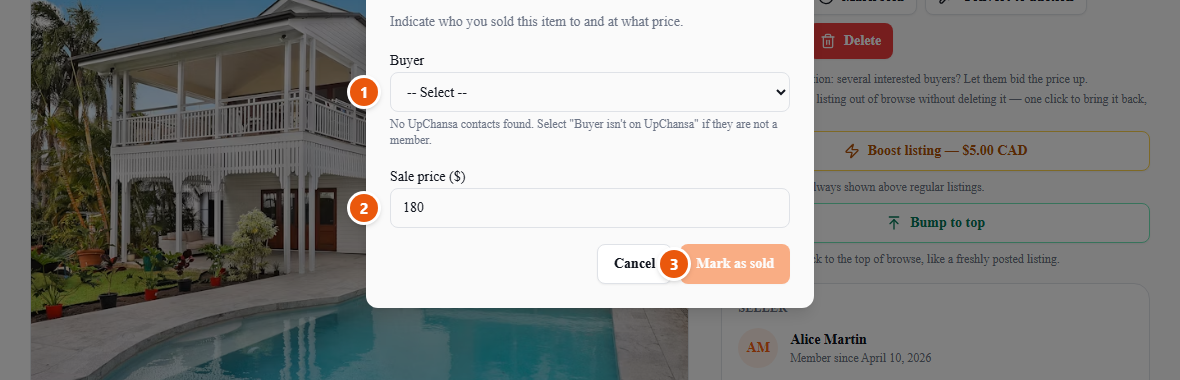
- 1Choose your buyer. Anyone who messaged you about this item is in the list — and if you sold it to someone who is not on UpChansa, pick that option instead.
- 2Enter what it actually sold for, not what you were asking. This is your own sale history, so an accurate number is worth more to you than a flattering one.
- 3Confirm. The listing moves to Sold straight away — your buyer has nothing to approve.
If the deal falls through afterwards, either of you can cancel the sale and the listing goes straight back to active, keeping its photos and its history. Nothing needs to be recreated.
Once it is done, leave a review. Reviews are public and carry your name, and they are the whole reason a stranger takes a chance on the next person — so they are worth the thirty seconds.