Exchange an item
Trade your item for someone else's, with or without cash to even it out.
An exchange is a swap: your item for someone else's, with or without cash on top to even things out. It works on regular listings — not on auctions — and only when the seller has said they are open to it, so nobody who simply wants to be paid ever receives a trade proposal.
- 1Tick “Open to exchange” — on the form when you post the item, or at any time afterwards from Edit. Until you do, the option is invisible to everyone and nobody can propose a trade.
- 2Say what you are looking for. It is optional, public and short — up to 200 characters — and it is what turns vague offers into useful ones: “a bike, tools, an iPhone” gets you those instead of everything.
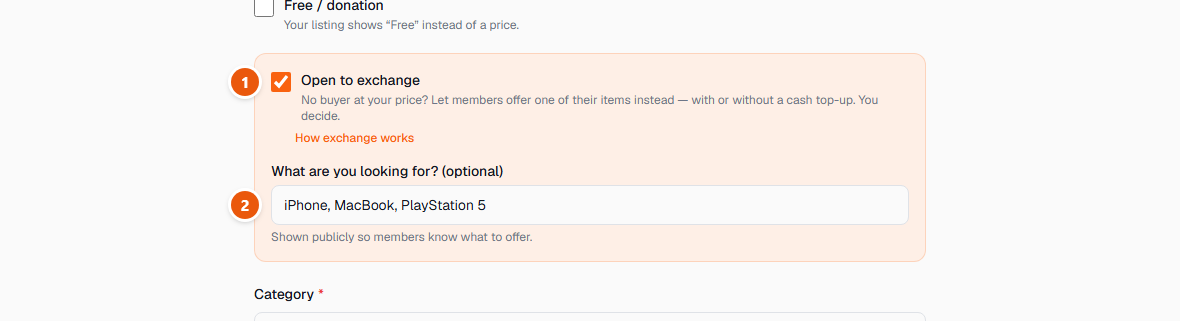
Your listing then carries an Exchange badge on the browse pages, and buyers can tick “Open to exchange” in the filters to see only items like yours. Your price stays exactly as it is — an exchange is an extra door, not a replacement for selling it.
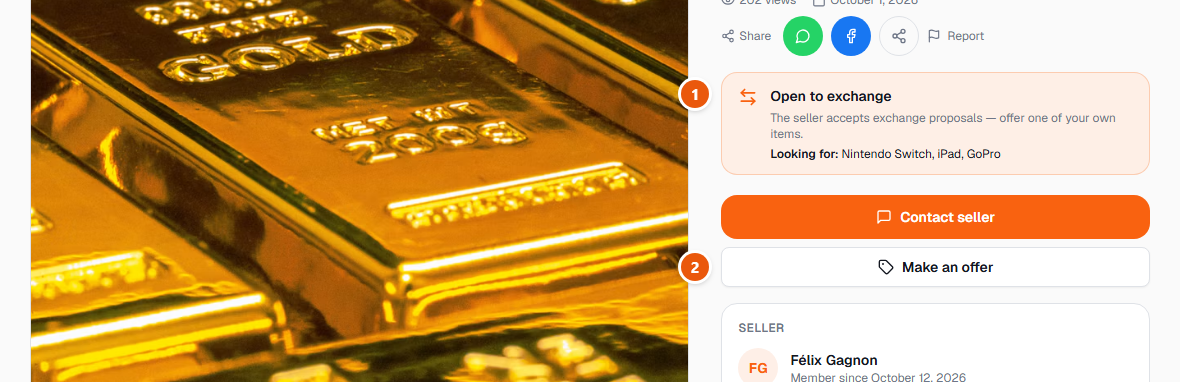
- 1On a listing open to exchange, a green panel says so and repeats what the seller is looking for. If it is not there, the seller only wants cash.
- 2Make an offer is the single door to both: it opens a window with a Cash offer tab and an Exchange tab. On an item given away for free there is nothing to negotiate, so only the exchange side is offered.
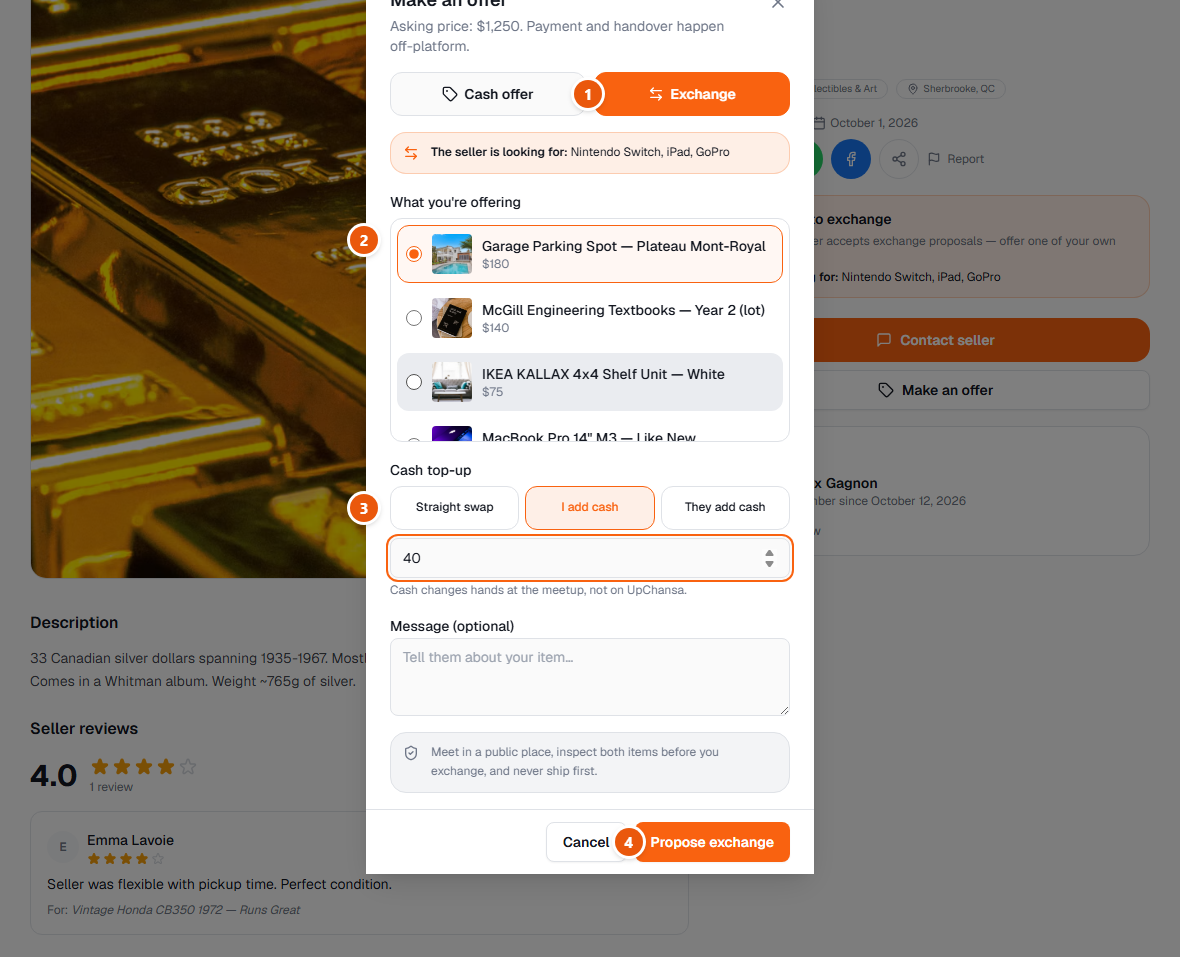
- 1Switch to the Exchange tab. What the seller is looking for is repeated at the top, so you can check your idea against it before you type anything.
- 2Pick the item you are putting on the table. It has to be one of your own active listings — deliberately, because it lets the other person open it, look at your photos and judge for themselves. No active listing yet? The window links you straight to the posting form.
- 3Choose the cash adjustment: a straight swap, you add cash, or they add cash — then the amount, in whole dollars. The money changes hands when you meet, never through UpChansa.
- 4Add a word about your item and send it. You can have only one proposal open on a listing at a time, so take a minute over it rather than firing off three.
- 1Answer from My offers, on your dashboard: accept, counter, or decline. A counter moves the cash difference only — the two items stay the same, so nobody can be switched onto a different object halfway through the conversation.
- 2Each line shows both items with their photos — what you give and what you get — and the difference written from your own side, so “+ $40 from them” means exactly that.
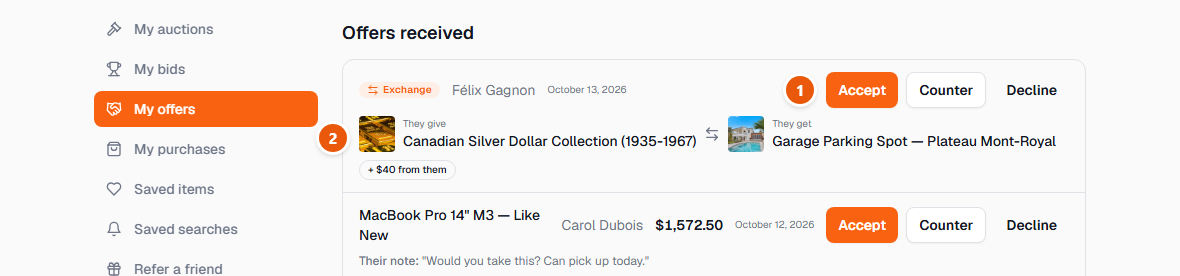
Accepting settles it immediately: both listings move to Exchanged, they leave the browse pages, and any other proposal still open on either item is declined for you. You are then put in touch to arrange the meeting, and afterwards each of you can leave the other a review — the exchange counts in your history exactly like a sale.
Meeting safely matters twice as much here, because there are two items to check instead of one. Meet in a busy public place in daylight, inspect both items before either of you hands anything over, bring the exact item you promised, and never ship first.
If it falls apart afterwards, either of you can use “Exchange didn't go through”. Both listings go back to active together, with their photos and their history — there is nothing to recreate, and nobody is left holding a listing marked Exchanged for an item they never received.
Giving something away works alongside it: tick “Free / donation” and your listing shows Free instead of an amount. Nobody can send you a cash offer on it — there is no price to negotiate — and people who want it join an “I want it” queue instead (see the guide on giving an item away). An exchange proposal still reaches you if you ticked the box, which is how “take it off my hands, bring me something useful” gets done.
Nothing is charged for an exchange, on either side. As everywhere else on UpChansa, if an amount is ever due it is shown to you before you agree to anything.