Help Centre
Create your account
Sign up, confirm your email, sign in. About two minutes.
One account does everything on UpChansa — buying, selling, bidding and messaging. You need an email address you can open right now, because we send a confirmation link to it before the account works.
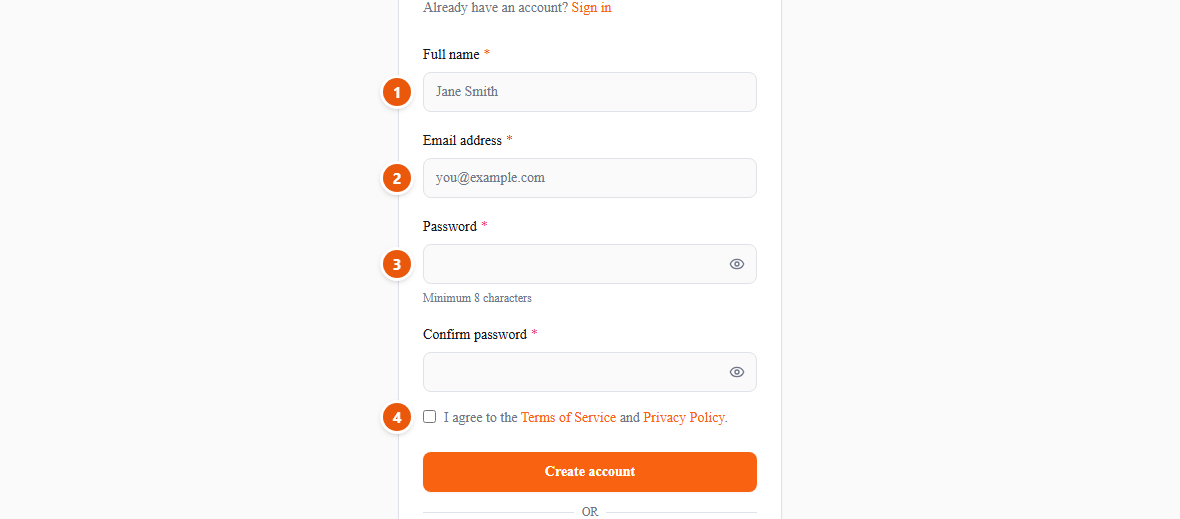
- 1Your name. This is what buyers and sellers see beside your listings and your messages, so use the name you are comfortable being known by.
- 2Use an email you actually check — the confirmation link goes there, and so does every message a buyer sends you.
- 3Choose a password of at least eight characters, then repeat it in the field below.
- 4Accept the Terms of Use and the Privacy Policy, then create your account.
Open the email we send and click the link. Then sign in — you land on your dashboard, and you can post right away.
No confirmation email after a few minutes? Check your junk folder first, then use “Resend verification link” on the sign-in page. “Continue with Google” skips the confirmation email entirely.